| WebEDI - All partners -input INVOICes data on WWW -input DESpatch ADVices data on WWW -39 EUR / month + volume (max 15 EUR) |
Bridge / interface / import+export - All partners -EdiPax SDK to help programmers -EdiPax AS2 CLient to automate telecommunication -In house format mapping + setup ORDERS : 300 EUR (orders) -In house format mapping : 600 EUR (INVOIC) -39 EUR + volume (max 15 EUR / month) -EdiPaxAs2client - 0 EUR (special offer = 450 EUR discount) -EdiPax SDK - 0 EUR (special offer = 450 EUR discount) -EdiPax Validator - 0 EUR (special offer = 300 EUR discount) |
AS2-EDIINT -Stand-alone AS2 server : 1790 EUR -Heavy duty AS2 gateway : 4290 EUR -No monthly fee, no volume fee -Requirement : internet access and security Refer to net+web_edi-services for detail |
Select your connectivity option and install !Your NetEDI Company Name = [CompName] - Your NetEDI User ID (GLN) = [CompEAN]
|
||||||||||||||||||||||||||||||||||||||||||
Detail
| TECHNOLOGY | DESCRIPTION | PRICE |
| X400 | You may ship your INVOIC to Mailbox: x400:c:cz;a:spt400;p:bricoint;s:ediserver0 Please specify your company outgoing X400 mailbox |
large volume partners : "cost+" base (contact us, max 33% surcharge) -small volume partners : 130 EUR set-up per partner, "cost+" base, we will charge -33% per message > 20K -50% per message < 20K on top of real X400 volume cost.All partners - X400 cost+ (33%->66%) |
| AS2 | My company use AS2/EDIINT -- More information -- |
EdiPax AS2 Client -150 EUR set-up -100 EUR security -450 EUR : client(s) license |
| WebEDI |
You may input INVOIC information using your internet browser.
The demo is available from http://webedi1.edipax.com/netediv33
user= 9999999999999 password= demo Register to open your WebEDI box - do not forget to specify your company name and contact person . use WWW interface to read, print B2B documents you receive use B2B interface to reply or input document you want send to partners |
-150 messages or 1 Mb per quarter (+/- 250 messages) free -38 EUR = 1MEGA limit = 650 orders or 500 despatch advises or 500 two lines invoices -additional 5 Mb charged 25 EUR per unit (25 EUR per 5 Mb) or 5 EUR/month |
| PaxGate | Free of charge, secured EDI document exchange. You may integrate PaxGate inside your application easily - you just call the EXE in the middle of a "command" file or your application to get and post your documents. (Request PaxGate connectivity) |
|
| EdiPax AS2 Client/server |
Free of charge, secured EDI document exchange service (Request EdiPaxAs2Client connectivity)
AS2 EDIINT is recommended connectivity solution. Select the client solution when you need to post secured messages to secured AS2 servers or exchange messages with EdiPax servers. Select the server solution when you want to receive secured messages - Just In Time - from any partners. |
AS2 secured client:
-150 EUR set-up -100 EUR security -450 EUR : EdiPax AS2 client(s) license AS2 server (MMC): 1790 EUR (Windows IIS v5/v6 required - download - 1 year support included) (*) AS2 gateway (MMC): 4290 EUR (Windows IIS v5/v6 required - on site installation and 1 year support included) |
| Email:/Smtp/Pop3 |
Receive orders by pop3, and Smtp for sending invoices and desadv(signed and encrypted). You can use the following email addresses when contacting Brico:
| |
| WebDAV |
Secure HTTPS/WebDAV access |
100 EUR security |
| FTP | 250 EUR : IPsec (client licence included) | |
| HTTP email | You may use the so-called "HTTP mail utility" to
communicate with EdiPax. Essentially, HTTP mail is a private email system that can be accessed from any computer connected to the Internet. It is a web-based application which is designed for your convenience and ease of use. |
|
| Other | Please contact me to specify in-house connectivity contraints | |
| set-up when performed by
EdiPax per EDI message type or mapping (Connectivity & Set-up) |
ORDERS ,INVOICes : 300->600 EUR | -150 EUR : set-up -100 EUR : security -450 EUR : AS2 Windows client(s) license |

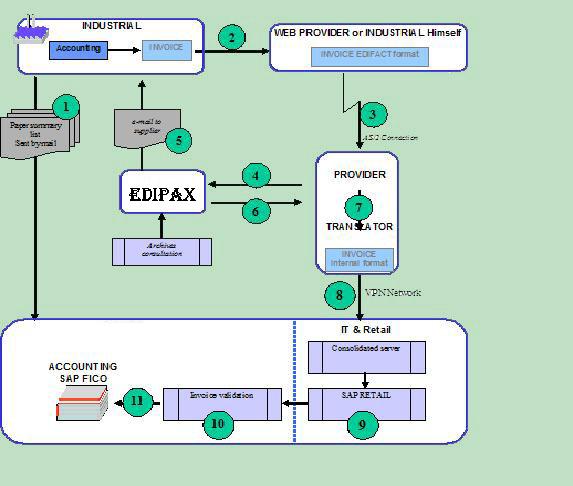
EdiPax System checks Brico invoices every 20min and locates new invoices . If it is found the application will create XML document in internal EdiPax format (XML) and will schedule the document to be post by AS2 to EdiPax AS2 server.
EdiPax application(EdiPax AS2 client) also checks incoming documents from AS2, which are used for document status update. The application also takes care about timeout and set the status to error when it expires.
Exchange formats



INVOIC Flow and Process
Edifact Validator:
EdiPax offer to you the possibility to check your Invoices with our sophisticate VALIDATOR System. It will check EDI documents before posting and ensure invoice quality. goto EdiPax VALIDATOR .
Message Log:
All registered Brico Suppliers can benefit from the use of the logging
service.
This service tracks all messages that are exchanged between you and EdiPax.
Your personal log file can be accessed from your inbox
.
Log files typically contain the following information:
- The date and time when the message was sent
- The sender and recipient details
- The result of the receive send operation
Resend Message:
You should respect certain rules when resending messages to Brico
Belgium.
- It is possible to resend most messages to EdiPax. However, you should use this option only if a message was not received properly so that you do not risk that the message will be received by EdiPax twice.
- In case of doubts, please, contact EdiPax support.

